
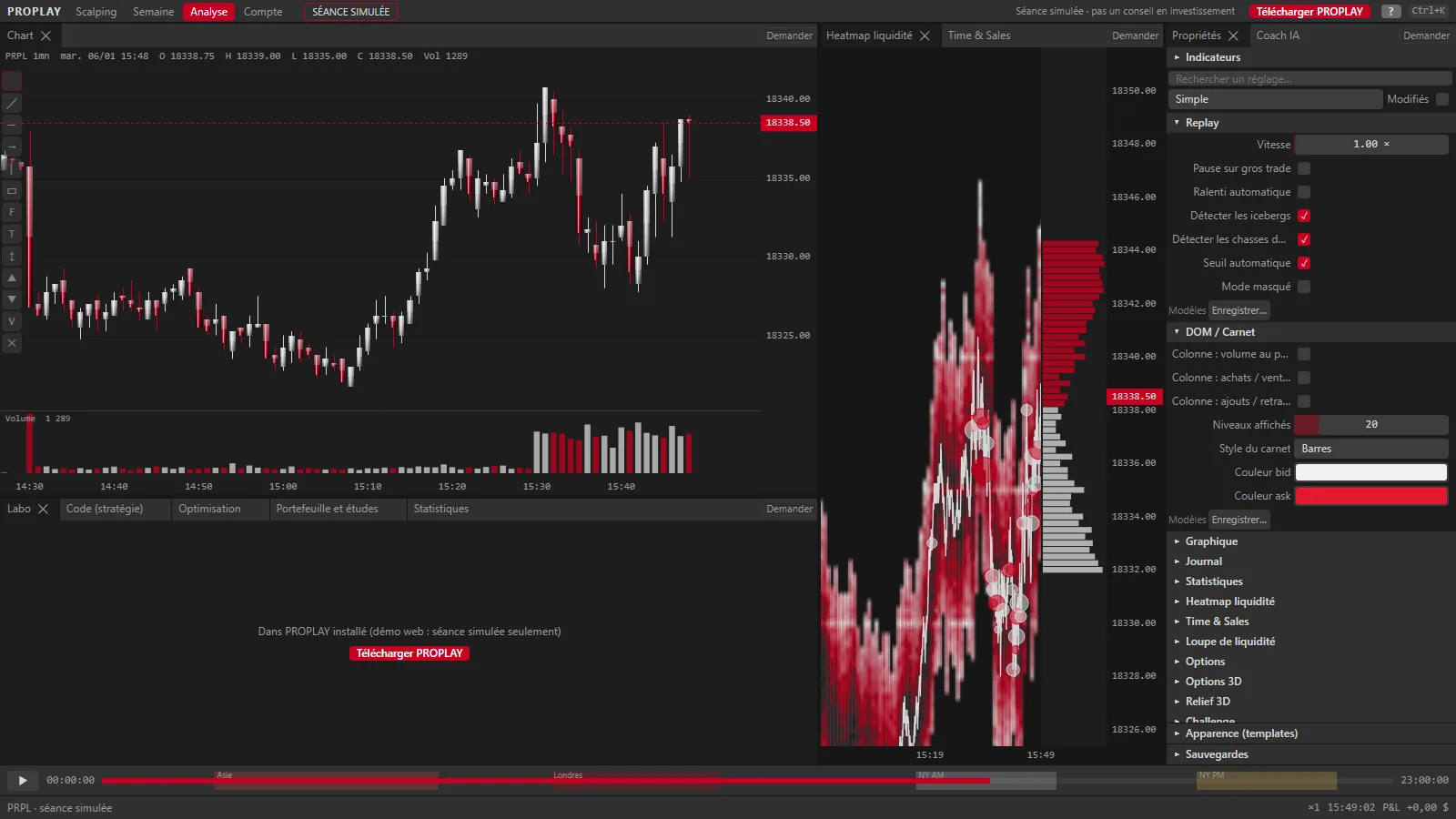
Next version · in progress
- Editing-app style timeline under the chart (clips, loop, markers), with jumps to the Asia, London and New York opens
- Audible price alarm (bell button): a sound rings and the replay pauses when the price gets there
- Heikin Ashi candles, alongside regular candles and the line chart Replay up to x1000.
- Cluster Statistic: a table under the chart with each candle's volume, ask, bid, delta, delta % and duration. Unrevisited POCs extended to the right until price first comes back. 10 more footprint cell modes: centred Bid x Ask and delta, volume + delta, profiles (volume, bid / ask, delta, bid / ask ladder, positive / negative delta) and heatmaps (volume, delta).
- Order book heatmap: 8 colour themes to choose from.
- 3D models, in progress: Liquidity wall, Session relief, Cockpit, Week, Spiral, Scalp 3D and an Options group (volatility surface, GEX by strike, options flow), with background and material settings. Going back to the 2D chart straightens the scene to face the screen.
- Scalping order panel: position, open P/L and daily P/L on one line, one-click quantities, a Buy / Sell grid at market, bid, ask, limit or stop, Reverse, Cancel / Breakeven, Cancel and flatten, OCO. Scalping workspace: book next to the chart and 15 s candles.
- Scalping keys for each action (buy or sell at market, bid or ask, reverse, breakeven, flatten, cancel, quantities), a scalper preset on F1 to F12, middle-click for a limit or stop order at the clicked price. Every key can be changed, and conflicts are flagged.
- Adjustable footprint: Bid x Ask, Delta or Volume cells, ticks per row, minimum volume for an imbalance, highlighted large cells, value area %, absorption threshold.
- Each multi-chart block shows what you choose: a chart, the book (bid / price / ask) or the tape (time, price, volume, delta).
- Live large options trades layer: diamonds on the underlying market, with an adjustable minimum premium. Crypto options from Deribit, OKX and Bybit.
- Interactive Brokers, in progress (not yet tried with a real account): PROPLAY connects read-only to your TWS or IB Gateway, with no order possible and no password in PROPLAY. Your ticks are kept for replay, option trades come with premium, implied volatility and delta, and a GEX is computed from your account's option chain. Market data is paid to IBKR.
- Lab: the data available for backtesting, market by market (sessions, period covered, share of real ticks).
- Animations across the app: panels, menus and windows fade in and out, visual feedback on orders. Animations setting: full, subtle or none.
- Drag the borders between the chart, the order panel and the right-hand column (double-click = default size); order panel and drawing tools on the left or right of the chart.
- Indian options (Nifty): coming soon, with your broker's key. Cboe delayed data (option chain, GEX) is only downloaded once you agree.
- Live crypto in the Data tab: free public streams from Bybit, OKX, Binance, Coinbase, Kraken and Deribit, with no account or key. The current candle follows each trade, and trades are kept on your PC to replay later. No order is sent to the exchanges.
- Flow button: the replay's NDX and SPX options flow, contract by contract, ranked by premium, bought or sold, with delta and the estimated market maker hedge in NQ / ES contracts. It is an estimate, made from the downloaded option contracts.
- Level inspector (Alt+click, in 2D and 3D): at a price, the quantity in the book over the last hour, its age, what was added, executed or pulled, and the trades at that price.
- Fast-forward to the next event (J): a price alert set on the chart (L then click), an order filled, a stop or target hit, a killzone or a news release.
- Blind test (🎲): a random day and time on the market, date and future hidden; a second click reveals the date.
- “What if?” on each trade: best possible exit, your exit efficiency, the result if held to the end or with break-even at 1R and target at 2R; “Replay this trade” takes you back just before the entry.
- Your rules and setups: the checklist shows before each entry, and the stats give expectancy in R per setup, rules kept or broken. Position size computed for a fixed risk from your stop.
- In 3D the chart becomes an object (position, rotation, scale on each axis), with Scalp, Front, Book, Top and Session cameras, the book as clickable towers, the footprint and GEX walls.
- 24 h circle (key 8): the day as a ring with sessions stacked, or as a spiral to compare the previous day, week and month on the same price scale; click a candle to go there, move with the keyboard or a gamepad.
- Zoom anchored on the candle under the mouse (Shift = fast zoom at the centre), Shift or Ctrl lock an axis while you drag the chart, Ctrl+I opens the indicators.
- Prop firm evaluation simulator in the Lab: your strategy goes through an account's official rules (or your own) over 500 different orderings of your real days, or 2,000 random draws. You see the verdict, how the attempts end, the number of days to pass, and every prop firm account compared. Simulated results on your data, not a promise of success.
- 3D chart view (key V): candles as volumes, relief, volume and profile, preset views on the numeric keypad. You can trade in it too: position with its SL / TP zones, pending orders, past trades, large trades as spheres, order book liquidity as a wall, Ctrl+click for a limit order, Buy / Flat / Sell buttons.
- Your own layout: long-press (or Settings › Customise) and each block can be removed, moved or enlarged; the right-hand panel goes to the left or right of the chart.
- Ready-made workspaces (Trading, Focus, Analysis, Multi, Lab, 3D) plus your own, as tabs; Ctrl+Page Up / Down to switch between them.
- Search for any action (F3), circle menus under the mouse (Q, Shift+A), a properties panel for the drawing and the view (P), number fields you adjust by dragging.
- Multi splits into zones: drag a corner to cut a zone in two, Ctrl+Space enlarges the one under the mouse, and when you close one its neighbour takes the space. Each chart can show its own order book heatmap, DOM and options.
- Advanced footprint: diagonal imbalances with an adjustable threshold, stacked imbalances extended into zones, absorption markers.
- A clearer Lab: big figures, mini charts, annotated equity curve, Monte Carlo fan and a validation gauge.
- Market days stored compressed: less disk space, older ones are packed in the background.
- Lab Analysis tab: MAE / MFE excursions, results by market regime and by session, the same strategy on every market in a group, and a walk-forward optimiser. Commission and extra ticks of costs can be changed on the results without rerunning the backtest.
- On first sign-in, a few questions (markets, how you read the market, training, level) pick the modules shown; you change them in the settings (Appearance, Region, Modules, Account). Beginner path in the Lab: 6 missions that unlock the tools, with tips from the assistant.
- Multi opens next to the main chart (up to 3 charts in a column) or full screen, where the main market keeps the largest cell with its heatmap, indicators and drawings. Drag one chart onto another to swap them; related markets are suggested first.
- Order book heatmap coloured by liquidity, updated every second near the price; orders pulled before being hit are boxed with their size; vertical zoom anchored on the price you point at; orders placed cell by cell (buy on the left, sell on the right).
- Line chart
- Playback ‹ ▶ › in the top bar; holding ‹ › speeds up to x600
- When a source fails, the Data tab offers the market's other free sources.
- Strategy Lab: backtest, robustness checks, risk, portfolio and report
- A strategy written in another language (C#, C++, MQL5, EasyLanguage, Rust…) can be imported too: the AI assistant converts it to Python, with your own API key.
- Order book view (DOM) as a tradable liquidity map, on crypto
- Each chart has its own market, timeframe, zoom, price scale, indicators and drawings, in free layouts with no gaps and dividers you can drag. Large trades, volume profile, footprint and GEX work there too, and your SL / TP and orders move with the mouse.
- Delta written on each candle, Delta and VA buttons on the chart, POC, VAH and VAL of each footprint candle, and a market profile (TPO).
- Market structure: FVG and IFVG, BOS / CHoCH, order blocks, breaker blocks, liquidity and sweeps, OTE, premium / discount, SMT divergence (NQ / ES, GC / SI…)
- Sessions: killzones, Asia and London highs / lows, Power of 3 (daily and weekly candle beside the chart), 6 h quarters and 90 min cycles, opening gaps
- Also: implied volatility by expiry (SPY, QQQ, SPX, NDX), a scanner of your downloaded markets (change, range and volume at the replay time) and crypto liquidity (Bybit funding and open interest).
- Copy your closed trades to other accounts of your choice
- Options: panel next to the chart, clickable chain, estimated GEX and Options account
- GEX computed from real option chains: zero gamma, call wall and put wall, heatmap on the chart, profile by strike beside it. It is an estimate: dealer positioning is assumed. History starts with your first snapshot.
- On crypto markets (BTC, ETH, SOL, XRP…), download a day's order book from Bybit's public archives, published the next day: bids and asks at the replay time, and a heatmap of resting orders by price on the chart.
- India and Asia markets: Nifty 50, Bank Nifty, Sensex, MCX gold and silver, CSI 300, Hang Seng, Nikkei, KOSPI, TAIEX
- Display currency based on your country ($, €, ₹, ¥, HK$, ₩, NT$), converted at the day's rate, and your country's markets highlighted
- Interface in Hindi, on top of the 6 other languages
- Place orders from each chart, with the same order panel as the single chart; linked or separate orders, and Buy all, Sell all, Flat all buttons.
- Fees, spread and slippage: No fees, Small, Normal and Big profiles, set separately for manual trading and the bot, with a reminder in the order panel
- Stats by account, then Manual, Bot or both, with a win rate gauge
- Adjustable on-screen messages: a few seconds, or errors only
- Adding to a position: a new order in the same direction joins the open position, at the average price
- SL and TP empty by default on each new position: you only place the ones you want
- Lot size calculator: your risk in $ or % and your stop in ticks give the number of lots, sent to the order panel in one click
- Dashboard in Stats: win rate, net P&L, last trades, best streak, best trade, days traded, next milestone and your days in colour
- Paste Pine Script or Python strategies: they run on your PC, with no API key or internet
- Data tab redone: market, source, replay in 3 steps; each source says what it provides and how far back it goes
- File downloaded from a source's website (HistData, Kaggle): PROPLAY picks it up and imports it by itself, with a progress bar
- NinjaTrader in 5 levels that tick themselves, with its free simulation account: no prop firm needed
- Market menu with categories, subcategories and search: it shows what is already downloaded, missing days and how far behind it is, and a star adds a market to favourites in one click
- Guided first launch in 3 steps: your market, its data, your first replay
- Chart screenshots: drag a rectangle, “My screenshots” gallery and export
- Volume profile: a period or a zone you draw on the chart
- New timeframe: 2 h
- Keyboard shortcuts help
- OCO: orders placed while it is on are linked, the first one filled cancels the rest
- Position history: entry and exit arrows on the chart and a table of the session's positions (key H)
- Sounds on fill, TP, SL, break-even, order placed and cancelled, can be turned off in the settings
- Display time zone of your choice, your PC's by default
- Light or dark theme, in the settings
- Favourite timeframes in the bar (star to add, right-click to remove), from 1 min to 1 year
- Quantity in micros, minis or contracts for futures, lots for CFDs, the coin itself for crypto (BTC, ETH…)
- Prop firm rules translated into the app's 6 languages
- Trades from an earlier replay of the same day no longer reappear on the chart (they stay in the journal)
- First launch on a naked chart: you turn on indicators and news markers yourself
- Limit and stop orders in one click: BUY or SELL, then a click on the chart at the price you want; the same to place an SL or TP
- Fills at the displayed price: limit and stop orders, SL and TP trigger the moment the moving price touches them
- Balance, today's P&L, room to drawdown and progress towards the target follow the open position live
- On a prop firm account, a trade taken after seeing what comes next counts as practice and does not move the balance; on a demo account, every trade counts
- Pending orders and the open position are kept overnight and over the weekend, until data resumes
- Break-even only once in profit, with an adjustable tick offset, also from the BE button on the position tag
- Day slider from 9:30 to 9:30 the next day, New York time
- Steady price scale during playback, right-hand margin set by dragging the chart
- Coming soon Macro tab: morning briefing, bias per market, past reaction to CPI / NFP / FOMC, news and COT positioning
- Data tab: status of your data and free sources you turn on yourself (Dukascopy, HistData, Kaggle, Databento…)
- “My data” assistant: the best free source for each market, guided step by step, and a session library that keeps growing
- The app opens in French by default, with dates, days and months in the language you choose
- News headlines in your language (Investing.com, FXStreet) and translated economic releases
- Coming soon Offline mode: one click prepares the calendar, COT reports, news and sessions, then the app runs without internet
- Market menu sorted by category (futures, CFDs, crypto), in ticks or 1-minute candles depending on the market
- CVD and Speed of tape greyed out on candle-only days, which lack trade-by-trade detail
- The rules of 12 prop firms, from evaluation to funded account
- Several accounts: personal demo or prop firm
- History of your accounts (in progress, blown, target reached, funded): resume an account where you left it, retry the evaluation, move to funded or archive it
- Lighter session preparation for your PC: your favourites and the last 60 days first, the rest when the PC is idle
- Each account is Futures or CFD: it follows its firm (FTMO, FundedNext, The5ers, FundingPips on CFDs, the others on futures) and only offers its own markets
- Market watchlist and each day's data type
- Volume profile on the chart
- Footprint: volume sold / bought at each price, imbalances, POC
- Large trades as proportional circles, with an adjustable minimum size
- 8 ready-made indicator templates: SMC, killzones, order flow, NY scalping, volume profile, trend, momentum, clean chart
- SL and TP dragged with the mouse on the chart, for every order
- The current candle forms continuously and the chart glides smoothly to the next one
- A day picked in the calendar opens at 9:30, the New York open
- Orders, SL and TP move without pausing the replay, and the SL / TP cannot cross to the wrong side of the price
- DCA: up to 10 limit or stop orders spaced X ticks apart in one click (1 / 2 / 3 / 5 buttons), cancellable one by one or all at once; fills either merge at the average price or stay as separate positions, each with its own SL and TP on the chart
- Fibonacci retracement from 23.6 to 161.8% with the OTE zone, volume profile framed in price
- Crypto in real ticks: Bybit public archives (buyer / seller side, since 2020), 7, 30 or 90 days downloaded in the background from “My data”
- Free data: Dukascopy CFD ticks, Binance crypto 1-minute bars, and futures candles from an unofficial source you turn on
- PROPLAY desktop shortcut on first launch